|
 |
|
Gameplay

Sound
 |
|
Graphics
Value
|
|
Reader Reviews
6 reviews. Average Rating: 5
• |
|
|
Publisher:  Genre: Sports Genre: Sports
|
|
Mac OS X: Any Version Mac OS Classic: Not Supported
CPU: G4 @ 1200 MHz RAM: 256 MB DVD-ROM Graphics: 32 MB VRAM |
|
|
|
Gameplay, Part 2
Now
that we have an overview of the game modes that Tiger Woods offers,
it's time to reveal that they all support a bigger objective: character
development. In Tiger Woods PGA Tour 2005, you start by creating your
own character (similar to a role-playing game), and then tackling the
challenges offered by the game modes in order to earn money,
sponsorships, and advance your career.
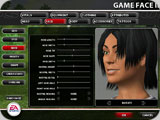
You may have customized
characters in games before, but Tiger Woods PGA Tour 2005's system,
dubbed "Game Face II," is by far the most comprehensive system I've
ever heard of in any game to date. The number of physical
characteristics that you can modify to change your alter-ego's physical
appearance is simply mind-blowing: attributes that you have probably
never considered before, such as the length of your character's
eyelashes, the shape of his or her face, or even the placement and
number of moles that he or she has is easily adjustable. The
possibilities are almost endless. For example, if you want to create a
personal Anna Kournikova (this possibility alone may have guys
searching for a demo), you probably can. If you're the kind of person
who spent at least 30 minutes trying to create a witty email address or
AOL Instant Messenger screenname, then expect to spend a very long time
in Game Face II.
Once you've created your character, never
fear—Tiger Woods will continue to give you endless options to customize
your new alter ego. Borrowing RPG (role-playing game) elements, the
money that you earn can be used to upgrade your character's attributes
and to buy new equipment that will be critical if you expect to have a
fighting chance against more challenging opponents. I was pleased to
see that much of this equipment comes from real-life manufacturers. It
is satisfying—and addicting—to be able to equip your character with
exactly the same kind of equipment and clothing that you might use in
real life. When I first started playing Tiger Woods, I found myself
running late to class and other appointments because I was unable to
tear myself away from the game.
Once
you're out on the course, you are treated to a beautiful environment
that sports grass and trees that blow in the wind, reflective water,
and wildlife that makes the course feel almost alive. When you hit a
great shot, the game switches into a widescreen mode with a "whoosh!"
that gives the action a cinematic feel and lends a great amount of
excitement to the game. Incidentally, the game automatically saves
replays of your best shots to allow you to watch them later, or show
them off to your friends.
While you play, Tiger Woods PGA Tour
2005 treats you to dynamic, running banter from two famous
commentators: Gary McCord and David Feherty. This commentary and the
addition of dynamic feedback from a crowd of spectators enhances the
feeling that you're part of a real, televised tournament. However,
there are some significant flaws with this system. While the narrators'
comments are usually interesting or amusing, players may find
themselves cursing the virtual David Feherty's putting advice, which is
usually terrible. Additionally, the commentators also have a tendency
to provide feedback on shots long before it is humanly possible to know
the outcome. You may have just hit a terrible slice that will
ultimately bounce through two sand traps and off a tree to land within
three feet of the pin, but they'll tell you what a great shot you hit
long before the ball even makes it to the first trap. This issue also
plagues the crowd's reaction to your shots. Occasionally, they may
groan when you sink a 40' putt, or explode in cheers when your perfect
putt is still ten feet away from the hole.
These issues aside,
the action and drama in playing a tournament is top-notch, and never
becomes repetitive or boring. When you feel the need for a change of
pace, the other game modes are waiting for you to provide a large
amount of variety, give you a chance to further upgrade your character,
and teach you to hit more complicated shots.
Briefly, Tiger Woods
PGA Tour 2005 does allow for online multiplayer, but since it is
limited to direct-IP and LAN play, most players will have a difficult
time finding a match.
Update: Tiger Woods PGA Tour 2005 also supports online multiplayer via the excellent (and free) Macintosh gaming service, GameRanger.
This is great news, as it completes the multiplayer picture for Tiger
Woods 2005, and should allow players to find opponents at nearly any
time with ease. If you would like more information, please see .
Controls
Tiger
Woods PGA Tour 2005 has two primary control schemes. The default system
(dubbed Trueswing) is almost entirely mouse based and is very
intuitive: in order to swing, you must click the mouse near the golf
ball, move the mouse back, and then forward to hit the ball. Whether or
not you hit the ball squarely is determined by the amount of
side-to-side motion of the mouse, the speed of its movement, and
whether or not you were able to return the mouse to its original
position. Thankfully, the game provides you with instantaneous feedback
on your swing by means of a graphical overlay. This makes it easy to
recognize and correct swing flaws, and assists in learning how to hook
or slice a shot on demand. On the default difficulty level, I wound up
ten strokes under par on my first round (using Tiger Woods). Under
higher difficulty settings the margin of error shrinks greatly, and the
consequences are proportionately higher. The highest difficulty level
is not for the faint of heart: I almost considered putting my mouse
between two large books in order to hit a ball reasonably straight (and
from what I've heard, that is the de-facto way to cheat in online play).
The
secondary control scheme that Tiger Woods offers is primarily geared
toward those who prefer the double and triple-tap systems (commonly
found in consoles) where you repeatedly tap a button at various points
in the swing to hit the ball. I would recommend sticking with Trueswing
because it provides greater control over your shots, and because double
and triple-tap systems are notorious for reducing putting to an
exercise in frustration. However, the fact that the option even exists
shows how well-planned this game was.
|
|